
By qlk.to · Updated
Product guidance with labelled examples. Figures in worked examples are illustrative.
Prepare the destination and a dedicated SMS link
Choose the page that matches the message and opens well on a phone. If you use campaign labels on that destination, build the full tagged HTTPS address first. qlk.to keeps the destination you save; extra query details added later to the shared short URL are not forwarded to the destination.
Create one campaign and a clearly named SMS placement. For a later send that needs a separate comparison, create another placement link. Reusing one link combines its activity.
- Prepare the final destination, including any UTM labels you need.
- Create the SMS placement link, save it and publish.
- Copy the published address into the message editor.
- Test the actual message and final page before sending to the intended audience.
Use the domain your messaging provider permits
Check your SMS provider’s current policy before sending. A generic short domain may be restricted for some routes or use cases. qlk.to does not guarantee delivery or make a destination compliant with a provider’s rules.
Paid qlk.to plans support a custom domain you own. Complete the ownership and secure-connection checks, wait until the domain shows Ready, then select it in the link editor. Keep the required domain settings in place. A branded link still needs to follow the provider’s rules.
Review activity after the send
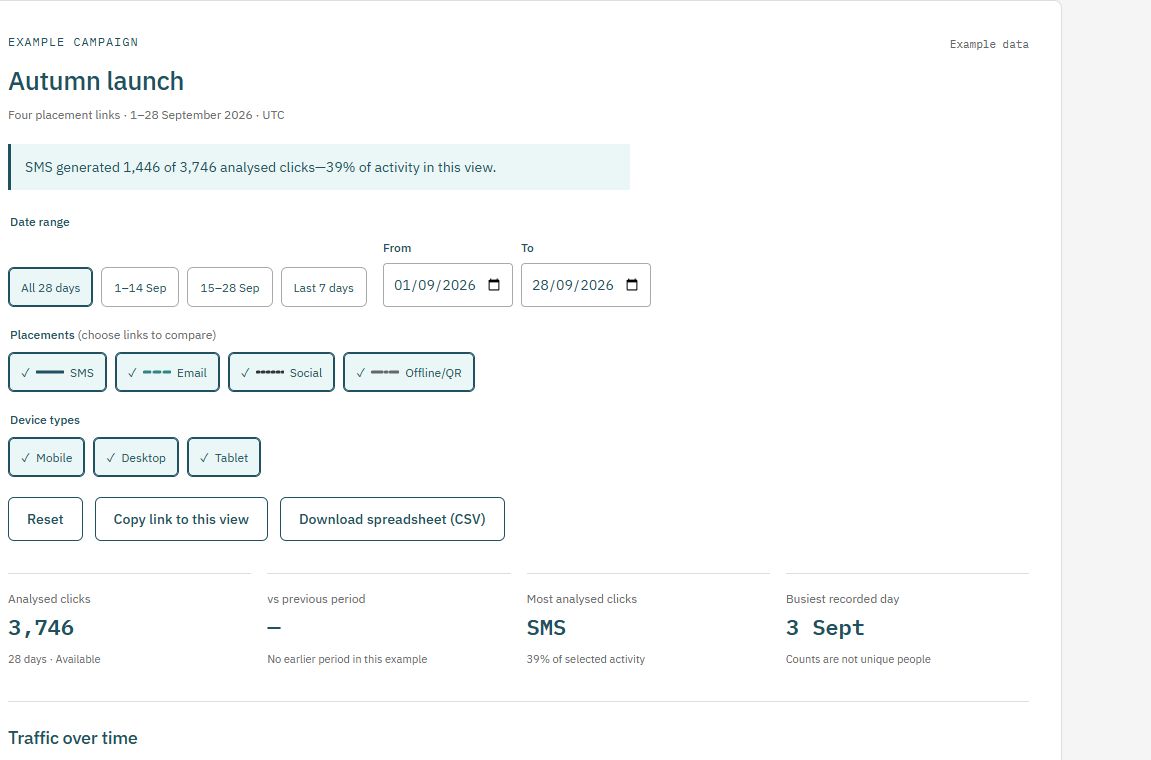
Select the campaign and SMS link in Reports, then choose the send period using UTC dates. Daily activity shows when recorded openings arrived. Device breakdowns provide context about the browsers opening the link, rather than a verified identity for each recipient.
Compare with your provider’s delivered-message total only when the send, link and reporting period correspond. If you sent multiple messages containing the same link, its total cannot separate those sends. Check reporting delays, exclusions and missing-data notices.
| Measure | Example | Interpretation |
|---|---|---|
| Delivered messages | 2,000 | From the corresponding provider delivery report |
| Analysed link clicks | 120 | Recorded eligible openings, including possible repeats |
| Clicks divided by delivered messages | 6% | 120 / 2,000; not a unique-recipient click rate |
Allow for previews, repeat visits and automation
Some messaging software opens a link to prepare a preview. Security services can inspect links too. Salesforce documents that Android message previews can inflate SMS link-click counts. Different providers and reporting systems apply different filters.
qlk.to excludes known bots and marked test links from analysed campaign activity, but some automation may remain. A person can also open the same message more than once. Treat an unusual spike as something to investigate alongside the send time, device mix and destination-side activity.
- Record internal tests separately from the audience send.
- Check whether clicks arrived before or immediately at delivery.
- Compare trends with destination-side sessions and meaningful actions.
- Describe the report as analysed link activity instead of verified people or sales.
Connect clicks with the result you care about
A successful redirect does not prove that the visitor finished loading the destination, consented to its analytics or completed a signup. Use destination-side analytics and confirmed sales or registrations to evaluate those outcomes.
The Free sample has limited retained links and analysed clicks, and ends 30 days from signup. Plan the live send around the capacity and link lifetime you need. Check current pricing before committing to a campaign that will outlast the sample.
Explore the report yourself
Use a consistent placement plan
Prepare destination labels in the UTM builder, then save the completed destination when creating your qlk.to link. Download the campaign-link plan (CSV) to record your published addresses and launch dates.
Check current plans and limits before a live send or print run. The Free sample’s links stop after 30 days from signup unless you upgrade.
Further reading
Salesforce documents preview-related SMS click inflation in its MobileConnect link-tracking guidance. Your messaging provider’s current rules and measurement definitions also apply.